Ableton Warp Modes Explained (Beginner’s Guide)
 By Freddie HarbFebruary 22, 20231 min read
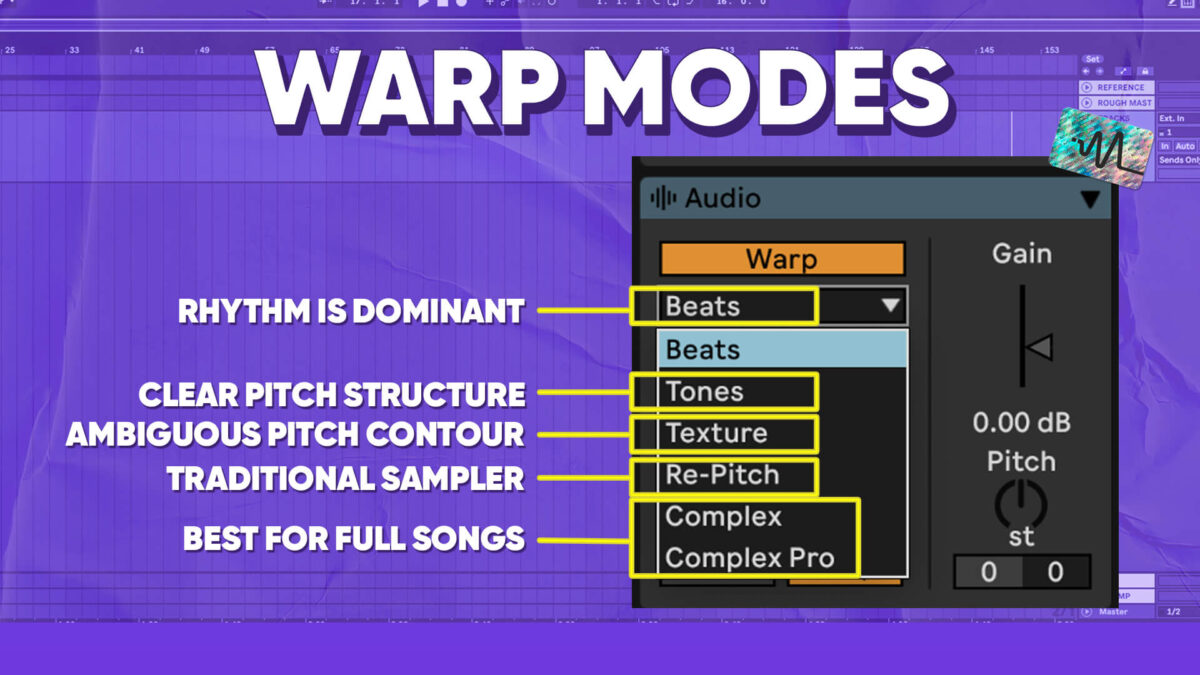
Ableton’s warping function has a great reputation among music producers. When it hit the market back in the early 2000’s it was the first of its kind. With its ability to adjust the timing and pitch of tracks, Ableton’s warping function has become a staple for producers everywhere. Other DAWs have mimicked this feature for example in Pro Tools it’s called Elastic Audio and in Logic it’s called Flex Time. But with different warp modes available, it can be overwhelming to know where to start.
In this comprehensive explanation of Ableton Warp Modes, I will guide you through each mode and its unique settings, empowering you to master the art of warping and take your music to new heights. Whether you’re a beginner or a seasoned producer, this detailed explanation will help you pick the right warp mode for the task at hand. This will help you to achieve better timing, enhance your sound, and unleash the full potential of Ableton’s warping function.
Thanks for watching this video on Ableton Warp Modes. Make sure to grab the free download below.
Want the setup I use? It is yours, free.